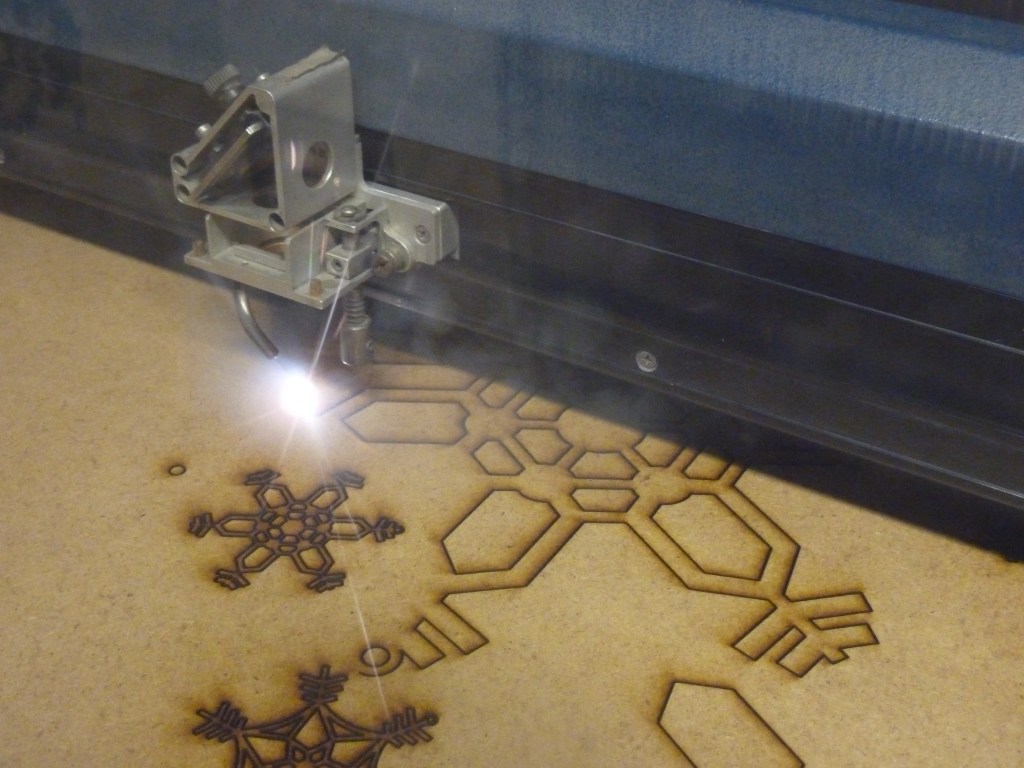
More and more creative spaces find themselves graced with products crafted using laser cutters, hefty devices that can carve, scratch, burn, sign, and—of course—cut a desired product into existence. But not every laser cutter performs the same tasks, has the same lifespan, or is suited to every crafter’s nuanced needs.
However, with interest in laser cutter crafts ever growing, there is something for everyone out there, from hobbyists to longtime pros, from business owners with visions for their brands, to decor enthusiasts who want to give their home some customized treasures you won’t see anywhere else.
Before committing to any one particular brand or type of laser cutter, it is worth knowing some essential vocabulary and principles of the hobby. So, let’s walk through the essentials so you can make an informed decision before diving into your greatest project yet.
The Two Primary Laser Cutters: Diode vs CO2
The first decision you need to make—and this is the one that matters more than anything else: whether to buy a diode laser or a CO2 laser. Not only are these two different models, but they are fundamentally different categories of how the laser cutter performs its functions.
Diode lasers are what most beginners start with. They are smaller, more affordable, and generally live in that $100 to $700 range. They are great for engraving and can handle light cutting on materials like thin wood, leather, and some acrylic, but they are slower and less powerful overall.
CO2 lasers, on the other hand, are the step up. They cost more—often starting around $700 and only climbing onward and upward—but they cut faster, cut cleaner, and handle thicker materials with ease. If a diode laser feels like a precise hobby tool, a CO2 machine feels more like a small workshop machine.
Another important logistical consideration: Both require venting. This will usually entail some sort of ventilation tubing running from the cutter to a window. So, when you’re mapping out your crafting station, regardless of cutter type, be ready to set up for adequate venting so each project remains safe and healthy for yourself and those around you.
What Do You Plan To Make?
Once you understand that split, the next question becomes much simpler: what are you actually trying to make?
If your goal is engraving—logos, designs, personal projects—a diode laser will usually get the job done just fine. If you want to regularly cut wood or acrylic, especially anything thicker or more precise, you will start to feel the limits of a diode pretty quickly.
And if you are even thinking about selling products, whether that is on Etsy or just locally, that is where a CO2 machine starts to make a lot more sense.
When deciding, don’t look at it as jumping right to the most expensive option; rather, you want to match the tool to the workload so you are not constantly working around its limitations.
Beginner vs Investment Machines
It helps to think in tiers rather than individual models.
Entry-level ($100–$300)
These are often open-frame diode lasers with no enclosure. They are best treated as learning tools. They are great for experimenting and getting comfortable, but not something that you will want to stick to long-term, especially if you want to produce many craft projects (for personal use or for an active small business).
Mid-range ($300–$800)
At this price range, the cutters offer better power, improved build quality, and sometimes enclosed designs. The machine is also capable without an overwhelming array of bells and whistles, so although entry-level cutters are probably the most welcoming, this level offers a solid foundation, even for newcomers.
Premium ($1,000+)
Capabilities get especially fancy here. This tier offers an enclosed design, higher wattage, faster speeds, and far more consistent, high-quality results. These are the machines people tend to keep for years, especially if they are producing items on a regular basis.
Software
One of the most overlooked parts of buying a laser cutter is the software ecosystem, which is increasingly a part of every machine, for better or for worse.
Some machines rely on cloud-based software, meaning you need an account and an internet connection just to use them. In some cases, features are even locked behind subscriptions.
Others use programs like LightBurn, which is a one-time purchase and runs locally on your computer.
So, when a subscription or lifetime purchase comes into play, deciding on which route to take with your machine may shape more than the initial cost of buying the machine alone. A machine that works offline, with software you control, tends to feel far more flexible and reliable over time. A machine tied to an account can feel simpler at first, but far more restrictive later, and if your connection is ever unstable or interrupted completely, your business could suffer severely.
Additionally, these software ecosystems offer users a chance to share designs. So, if you found a great way to craft a customized summer standee and want to share with others, check out what program your machine of choice supports. Similarly, maybe a designer has a fun-looking keychain project you want to make for your coworkers; with the right software environment, that is suddenly possible.
Hidden Costs
This is where a lot of “great deals” start to look a little different.
Ventilation is a big one. Laser cutting produces smoke and fumes, and depending on the material, those fumes can be unpleasant or even unsafe. That often means setting up airflow, using an enclosure, or venting out a window.
Materials add up too—wood sheets, acrylic, leather—especially when you are learning and experimenting. On top of that, there are replacement parts, maintenance, and sometimes software licenses.
None of these are dealbreakers, but they are part of the real cost of ownership that you will have to account for again and again for the rest of the machine’s life.
Common Problems
Almost everyone hits the same bumps early on, and knowing them ahead of time helps a lot.
Cuts that burn instead of slice cleanly are usually a matter of power settings or material choice. Smoke buildup can affect both visibility and results if ventilation is not handled properly.
Focus and alignment issues can lead to inconsistent cuts, and the software itself can feel confusing at first until it clicks. None of this is unusual—it is just part of learning the tool.
Quick Note on Safety
Not every material is safe to cut, and some plastics can release harmful fumes. Enclosures, proper ventilation, and a bit of awareness go a long way here. Most modern machines help with this, but it is still something to keep in mind.
Which One Should You Choose?
If you boil it all down, the decision becomes pretty straightforward:
- Just curious → start with a budget diode laser
- Serious hobby use → go for a mid-range (ideally enclosed) diode
- Selling products or want clean, fast cuts → invest in a CO2 machine
Laser cutters sit in that rare category of tools that feel a little futuristic but are becoming more accessible by the day. The key is not to chase the most powerful or most popular option, but to choose the one that fits how you actually plan to use it.
Get that part right, and everything else—from your first picture frame to your first elaborate 3D map—tends to fall into place.





 Daly Wordcraft
Leave a comment